Understanding HTML Tags and Elements

What is HTML?
Before understanding about HTML tags and elements, let us know about it. HTML stands for Hyper Text Markup Language, it is a skeleton to your webpage, which provides the basic structure and in simple word if you compare webpage to your body then:
HTML → Skeleton
CSS → Skin (used for beautification of HTML)
JS → Brain (provides functions to all sections of webpage)
There are various version of HTML, the current version is called as HTML 5, which is the 5th version. Web Hypertext Application Technology Working Group (WHATWG) govern the working of the HTML, they maintain the living standards of HTML, which defines how browser should parse and render HTML. There are many different tags(tags are the instruction that tells browser what the content is it), and there are different section in a HTML, first lets learn about different section then tag:
Different Sections of a Webpage:
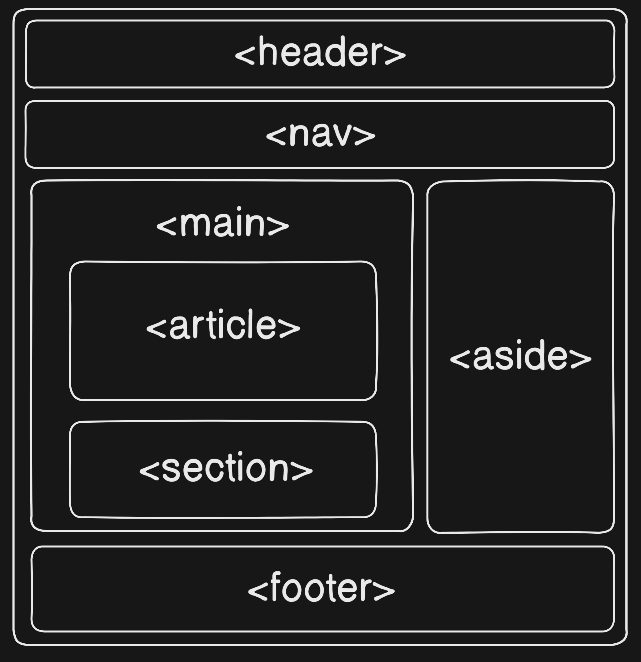
Different sections of Webpage are:
<header> → inside header tag we generally use it for introductory content, for example heading, navigation links
<nav> → nav stands for navigation, so we use this section to add navigation link
<main> → it is the main part of the webpage, which will be at the center of the webpage
<article> → this tag content, article/long contents
<section> → it is a thematic grouping of related content that only makes sense within the context of a larger page or article
<aside> → this can on the left side of a webpage or on the right side of webpage, they are smaller section which is generally used to display table of contents and ads.
<footer> → the bottom most part of webpage, where we provide details about developer, links and contact details.
These different sections are the semantics, set as a standard and it is not mandatory to use these every time, but better to use these as they come with predefined size, placement and many other things.
Boilerplate Code
<!DOCTYPE html>
<html lang="en">
<head>
    <meta charset="UTF-8">
    <meta name="viewport" content="width=device-width, initial-scale=1.0">
    <title>HTML</title>
</head>
<body>

</body>
</html>
This code is called as Boilerplate code, it is has various sentences of code which has some predefined message, For example <!DOCTYPE html> this sentence means the current document is of type HTML, <html lang=”en”>, this sentence means we are going to make use of english to write and in <head> section there is a line as <meat charset =”UTF-8” that is used for encoding of special characters such as emojis . There exists other version of UTF as well like UTF-16. And then <meta name=”viewport” ….> means how the page should scale on different sizes. The discussed 6 types of sections are written inside the body tag.
Tags and their meanings:
Now let’s learn about different types of tags and their use cases, before that first let us know what is opening and ending of a tag. If you consider the above code, you would observe <html> and it ends as </html> or <body>you write your code here </body>. To open a tag we don’t make use forward slash but while closing a tag we make use of it. These are the protocols by WHATWG. Tags and their use cases are:
| Tags | Use cases |
| <h1>, <h2>, <h3>, <h4>, <h5>, <h6> | These are 6 different heading levels, this tag is used to write headings of the webpage |
| <p>Your paragraphs comes here</p> | The p tag is used to write paragraphs |
| <a href=”youtue.com/srujan”>Visit YT</a> | Anchor tag is used to link a link to a text/image or a content |
| <ul>, <li> and <ol> | These are used to write content in point wise, where ul stands for unordered list, li stands for list and ol stands for ordered list |
| <input type=”email” name=”” id=””> | This is a tag that is used to take input from the users and pass it to server, there are various kind of input types, such as type=”text”, type=”numbers”, many more explore them |
| <button> | There are different types of button such button to submit the entered value |
| <br> | This tag is used to break line and move to next line |
| <table></table> | We use this tag to create a table, there are various other tags such as <thead>(the top most row of the table> and <tbody> within this tab we fill the table |
| <div> </div> | It is like container, used in place of those section, it as no semantic meaning |
| <video src=”chaicode.mp4” controls></video> | This tag is used link a video in the webpage |
| <audio src=”chaicode.mp3” controls></audio> | This tag is used link a audio in the webpage |
| <img src=”chaicode.png”> | This tag is used to attach a image in the webpage |
| <em> | used to make emphasis on content, used for the content which we want to stress on |
| <b> | this tag is used to make text bold |
| <strong> | this tag is used to make text strong |
| <i> | this tag is used to make text italics |
https://html-assignment-93jtoiasj-srujanpattar1s-projects.vercel.app/
Follow this link, where I’ve built my resume just using pure HTML and source code is also linked in the top most line of the page.
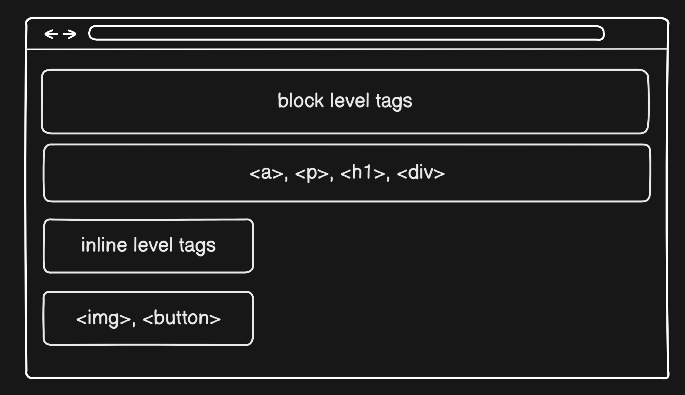
Block level VS Inline level
Based on the area these tag cover the width they are divided into two type:
Block level tags: these tags takes full space of that line/occupies full default width available
Example: div, p, h1
Inline level tags: these tags take spaces as much as width is needed:
Example: a, span, em